No subscription. No plans.
Turn every thank-you page into a second sale
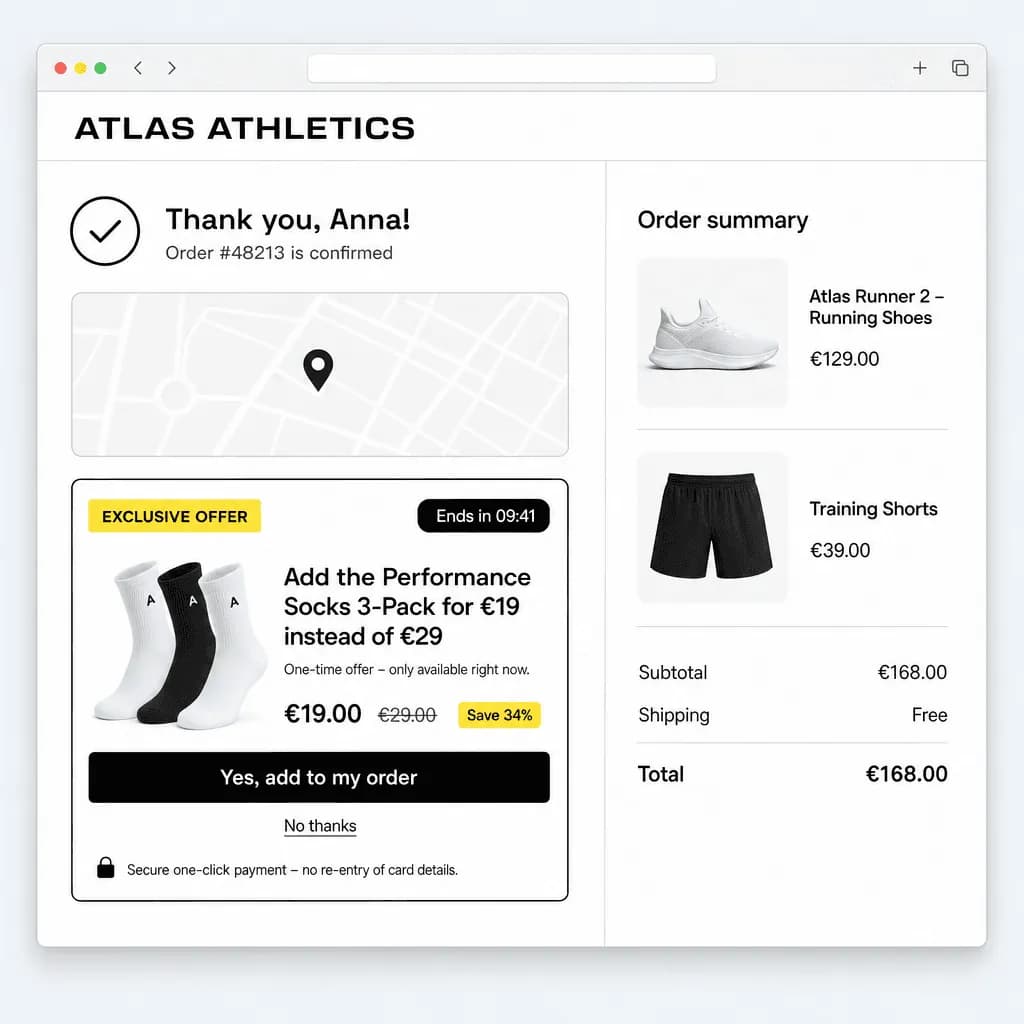
MrUpsell shows a one-time offer right after checkout and charges it with a single click – using the payment session your customer just authorised. You only pay when we make you money.
- No subscription – 3 % of the upsell revenue we generate
- No card required to start
- Setup in 10 minutes
- GDPR-compliant, hosted in the EU
- 15–25%
- typical acceptance rate on well-targeted offers
- 1 click
- from offer to paid upsell order
- 0
- customer records sent to MrUpsell
- < 10 min
- from install to first live offer
How it works
Three steps to your second sale
From install to your first accepted upsell in under an hour.
- 01
Connect your store
Install the WooCommerce plugin or the Shopify app and connect your shop with one click – no license keys, no code changes, no theme edits.
- 02
Create an offer rule
Pick trigger products or categories, choose the upsell product and discount, set a countdown. Optional funnel steps for accept/decline.
- 03
Earn on every thank-you page
Customers see the offer right after paying and accept it with one click. The existing payment session is charged – no re-entering card data.
Features
Everything you need to sell more after checkout
Proven in production with high acceptance rates – now generalised for every WooCommerce and Shopify store.
True one-click purchase
Charges the upsell against the payment session of the original order – Stripe, PayPal or Shopify Payments. No checkout, no re-entering card data.
Funnels: upsell, upsell, downsell
Up to three steps per rule. Show a follow-up offer after accept or a cheaper alternative after decline.
Countdown that converts
The timer starts on the first thank-you page visit and is enforced server-side, so urgency is real and fair.
Full design control
Colours, radius, layout, position, image or video – matches your theme out of the box, and hides our branding if you prefer.
Analytics that matter
Impressions, acceptance rate, revenue per rule and per gateway – in the plugin and cross-shop in the MrUpsell dashboard.
GDPR-ready, hosted in the EU
Only aggregated numbers ever leave your store. No customer data is sent to MrUpsell. Amounts are always calculated server-side.
Platforms
Built for WooCommerce and Shopify
Same offer model, same dashboard – native integration on each platform.
WooCommerce plugin
WordPress 6.2+ · WooCommerce 8+ · PHP 8.1+
- One-click via WooCommerce Stripe Gateway and PayPal Payments (vaulting)
- Offer on the native thank-you page, works with any theme
- Connect your shop with one click – no license keys, automatic updates
- No subscription: 3 % of upsell revenue, invoiced monthly to your card
Shopify app
Post-purchase checkout extension · Shopify Payments
- Official post-purchase page between payment and thank-you page
- Shopify charges the upsell with the existing authorisation
- Configure rules in the embedded admin – 3 % revenue share billed via Shopify
- Optional cross-platform statistics in the MrUpsell dashboard
Pricing
No subscription. No plans.
You only pay when we make you money: 3 % of the upsell revenue MrUpsell generates. No monthly fee, no tiers, no card required to start.
Drag the slider to what MrUpsell could add to your store – this is revenue you would not have made otherwise.
You keep
€1,940.00
97 % of the upsell revenue
MrUpsell fee
€60.00
3 % · billed monthly in arrears
€0 monthly · €0 setup · no card required to start
What's included: everything.
- Stripe one-click upsells
- PayPal one-click upsells
- Statistics per rule and gateway
- Funnels with up to 3 steps (upsell → upsell/downsell)
- Full design control
- No MrUpsell branding
- Unlimited shops per workspace
- Priority support
- Unlimited offer rules
- Unlimited upsell revenue
- Countdown, triggers, targeting
- Automatic plugin updates
- Cross-platform dashboard
Fees are calculated on accepted upsell orders minus refunds and billed monthly in arrears – via the card on file for WooCommerce, via Shopify billing for Shopify. All prices exclude VAT.
Merchants
What a second sale looks like
“We switched the thank-you page on and had our first accepted upsell the same afternoon. No checkout changes, nothing to explain to customers.”
Example: Lena M.WooCommerce store, skincare “The countdown plus one click is the whole trick. About one in five orders now adds the refill pack – revenue we simply didn't have before.”
Example: Jonas K.Shopify store, coffee subscriptions “Paying only a share of the upsell revenue made the decision easy. Nothing sold, nothing paid – it is the fairest pricing we use.”
Example: Priya S.WooCommerce store, outdoor gear
Illustrative example quotes – replaced with real merchant feedback as it comes in.
FAQ
Frequently asked questions
How can the upsell be charged with one click?
During the original checkout we ask the gateway to keep the payment method usable for a follow-up charge (Stripe: setup_future_usage, PayPal: vaulting, Shopify: the post-purchase authorisation). When the customer accepts, the store charges the upsell server-side. 3-D Secure is handled in the browser when a bank requires it.
Which payment methods are supported?
WooCommerce: Stripe (cards, Apple Pay, Google Pay via the official WooCommerce Stripe Gateway) and PayPal (WooCommerce PayPal Payments). Shopify: everything Shopify allows for post-purchase offers, primarily Shopify Payments. For other methods the offer is simply not shown.
Does MrUpsell see my customers' data?
No. Your store only sends aggregated numbers (impressions, accepts, upsell revenue, refunds) to the MrUpsell hub for the dashboard and the revenue-share invoice. Names, emails, addresses or card data never leave your store.
Is there a free plan?
There is no plan at all – it's free until your first upsell sells; then 3 % of the upsell revenue MrUpsell generates. No monthly fee, no tiers, no feature gates.
When is the fee charged?
Monthly in arrears. On the 1st of each month we invoice 3 % of the previous month's net upsell revenue (accepted upsell orders minus refunds). WooCommerce merchants pay via the card on file in the MrUpsell dashboard; Shopify merchants via Shopify billing as a capped usage charge on their Shopify invoice.
Can I use it on a staging site?
Yes. Connect as many shops as you like, and disconnect a site in the dashboard at any time. Test orders that are refunded do not count towards the fee.
How do I cancel?
Deactivate the plugin or uninstall the app – there is no contract to cancel. Fees already earned in the current month are invoiced at the start of the next month; after that you pay nothing.
Ready for your second sale?
Create your account, connect your store and show your first offer today. No subscription – 3 % of what we sell for you, nothing before.